Manage Clubs
Clubs are the foundational units through which you manage your sports organization—be it a soccer club, a swimming team, or a martial arts school. Each club can have many members: athletes, parents, coaches, and volunteers. Properly setting up clubs and managing memberships lays the groundwork for effective coordination of carpooling, events, and internal communication.
This guide demonstrates how to create new clubs, import members, and modify membership records. You’ll also learn about suspending or reactivating a club as needed.
Typical Workflow
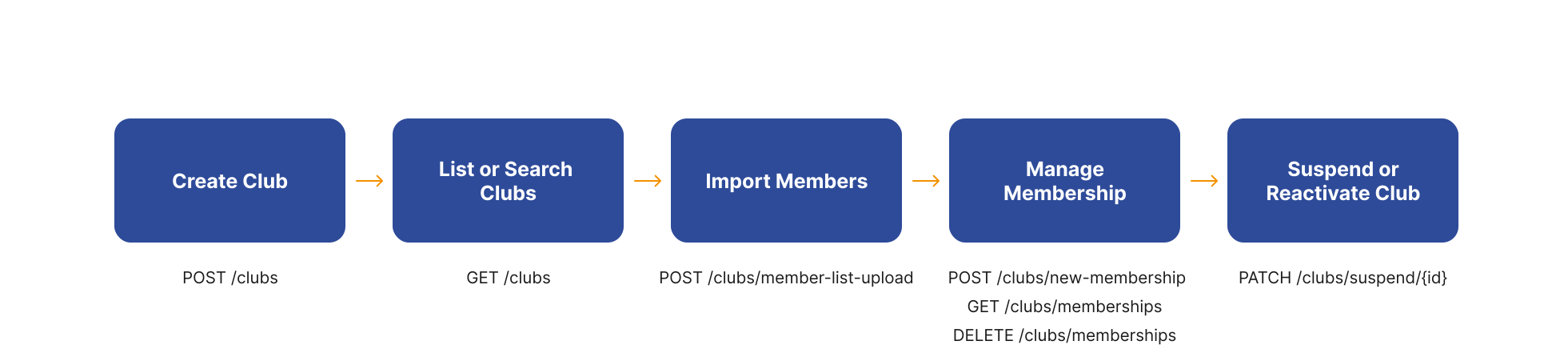
1. Create a New Club
Before you can add members or manage rosters, you need a club record in COOLROOL using the POST /clubs endpoint. Once created, each club can be enriched with details like logo, social media links, and contact information.
- Example request
- Example response
curl --request POST \
  --url https://api.coolrool.com/clubs \
  --header 'Authorization: Bearer <ADMIN_TOKEN>' \
  --form 'name=Thunder FC' \
  --form 'zipCode=12345' \
  --form 'country=France' \
  --form 'city=Paris' \
  --form 'address=123 Stadium Road' \
  --form 'email=info@thunderfc.com' \
  --form 'primaryPhone=+33-555-123456'
{
  "id": 1001,
  "name": "Thunder FC",
  "country": "France",
  "city": "Paris",
  "address": "123 Stadium Road",
  "createdAt": "2025-01-15T10:00:00.000Z",
  ...
}
2. List or Search Existing Clubs
After creating a club, you or other admins may want to check all available clubs or search for specific ones. COOLROOL offers both paginated and unpaginated listing methods, depending on whether you need quick lookups or structured pagination for large sets of clubs. You can use the GET /clubs endpoint to list all clubs or search for specific ones.
- Paginated, cURL
- Unpaginated, cURL
- Example response
curl --request GET \
  --url "https://api.coolrool.com/clubs?skipPages=0&pageSize=10&searchValue=Thunder" \
  --header 'Authorization: Bearer <TOKEN>'
curl --request GET \
  --url "https://api.coolrool.com/clubs/all" \
  --header 'Authorization: Bearer <TOKEN>'
[
  {
    "id": 1001,
    "name": "Thunder FC",
    "city": "Paris",
    ...
  },
  {
    "id": 1002,
    "name": "Lightning Swim Club",
    "city": "Marseille",
    ...
  }
]
3. Import Members in Bulk
When your club has multiple members—like entire teams or entire families—it’s time-consuming to add each one individually, you can use the POST /clubs/member-list-upload endpoint to import them in bulk. By preparing a CSV file of names, phones, and emails, you can swiftly onboard everyone at once.
- Example request
- Example response
curl --request POST \
  --url https://api.coolrool.com/clubs/member-list-upload \
  --header 'Authorization: Bearer <ADMIN_TOKEN>' \
  --form 'clubId=1001' \
  --form 'sendEmail=true' \
  --form 'sendSms=true' \
  --form 'csv=@/path/to/members.csv'
[
  {
    "name": "Alice Smith",
    "phone": "+33612345678",
    "status": "Imported"
  },
  {
    "name": "Bob Doe",
    "phone": "+33698765432",
    "status": "Imported"
  }
]
Each imported member receives an SMS prompting them to download COOLROOL, which auto-links them to your club.
4. Manage Individual Membership
Beyond bulk operations, you may need to add a single new member or check someone’s membership details using the POST /clubs/new-membership endpoint. Perhaps a new coach joins mid-season, or a user decides they need to leave the club.
- Example request
- Example response
curl --request POST \
  --url https://api.coolrool.com/clubs/new-membership \
  --header 'Authorization: Bearer <ADMIN_TOKEN>' \
  --form 'clubId=1001' \
  --form 'name=Charlie Davis' \
  --form 'phone=+33611122233' \
  --form 'email=charlie@domain.com'
  --form 'isPassenger=true'
  --form 'isDriver=false'
{
  "id": "abc-123-uuid",
  "name": "Charlie Davis",
  "phone": "+33611122233",
  "clubId": 1001,
  "createdAt": "2025-02-01T09:00:00.000Z",
  ...
}
Checking or Deleting Membership
GET /clubs/memberships: Retrieve membership info.DELETE /clubs/memberships: Remove membership from a club (requires specifying relevant IDs).
5. Suspend or Reactivate a Club
Occasionally, a club may need to be put on hold—for instance, during off-season or financial disputes. By suspending a club, you effectively block new events and memberships until reactivated. This step is admin-only to ensure the feature isn’t misused.
- Example request
- Example response
curl --request PATCH \
  --url "https://api.coolrool.com/clubs/suspend/1001?suspendStatus=true" \
  --header 'Authorization: Bearer <ADMIN_TOKEN>'
200 OK
"Suspend club"