Manage Family & Relatives
Many sports clubs have members who are underage or need a guardian’s assistance in setting up their account—think of parents signing up their children, or older siblings managing rides for younger ones. COOLROOL supports linking relatives so parents, guardians, or other family members can manage these profiles from a single account. This guide will show how to add, view, and update those relationships, making it easy for families to coordinate carpools and event logistics.
Typical Workflow
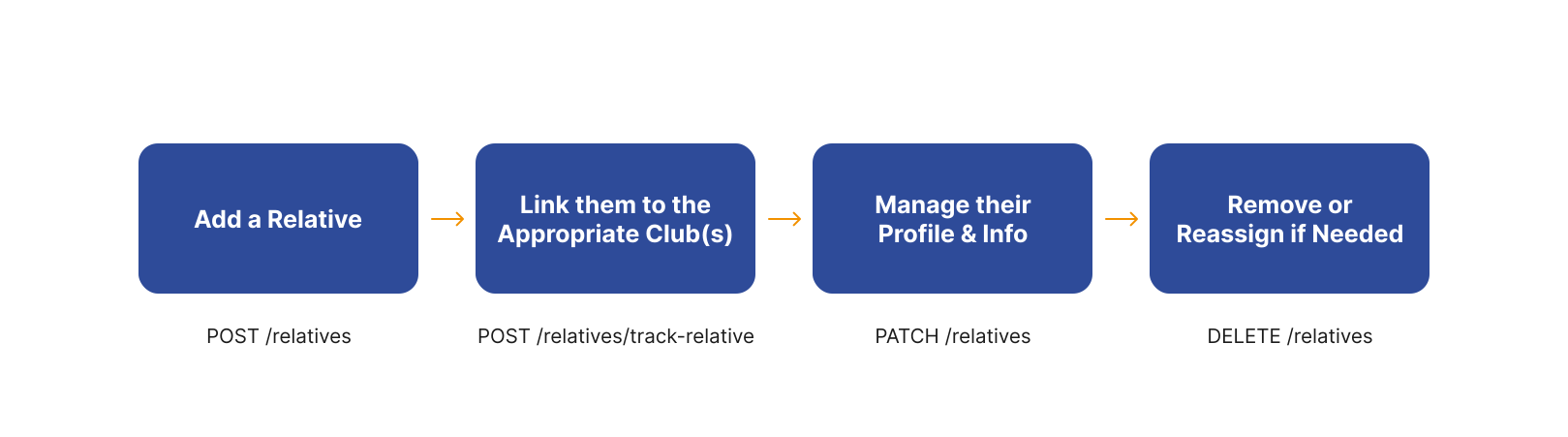
1. Add a New Relative
If a user wants to sign up a child or someone in their family who can’t manage their own app account, they’ll add a relative under their profile. This also works if you’re an adult caretaker registering an elderly family member for a sports activity. For this, you can use the POST /relatives endpoint.
- Request
- Response
curl --request POST \
  --url https://api.coolrool.com/relatives \
  --header 'Authorization: Bearer <USER_TOKEN>' \
  --form 'name=Timmy' \
  --form 'surname=Smith' \
  --form 'phone=+905521234567' \
  --form 'role=Child' \
  --form 'clubs=["1001"]' \
  --form 'img=@/path/to/child-photo.jpg'
{
  "id": 2001,
  "role": "Child",
  "relativeName": "Timmy",
  "relativeSurname": "Smith",
  "phone": "+905521234567",
  "isConfirmed": false,
  ...
}
2. Associating a Relative with a Club
If your child joins a soccer or dance club, you want them to appear on that club’s roster so they can be invited to events and carpools. This can happen automatically if you included clubs=["1001"] when you created them. Otherwise, you can explicitly link them to a new club later. To do this, you can use the POST /relatives/track-relative endpoint.
- Request
- Response
curl --request POST \
  --url https://api.coolrool.com/relatives/track-relative \
  --header 'Authorization: Bearer <USER_TOKEN>' \
  --header 'Content-Type: application/json' \
  --data '{
    "relativeId": 2001,
    "clubId": 1001
  }'
{
  "id": "relative-club-link-uuid",
  "user": "...",
  "relative": "...",
  "clubMembership": "...",
  ...
}
2. View or Update Relative Details
Whether you want to see a list of all your children’s accounts or need to correct an email/phone number, COOLROOL offers endpoints to retrieve and modify relative info.
List All Relatives
The following example shows how to list all relatives for a user using the GET /relatives endpoint.
- Request
- Response
curl --request GET \
  --url "https://api.coolrool.com/relatives?byPhone=false" \
  --header 'Authorization: Bearer <USER_TOKEN>'
[
  {
    "id": 2001,
    "role": "Child",
    "relativeName": "Timmy",
    "isConfirmed": false,
    "clubs": [ "1001" ]
  },
  {
    "id": 2002,
    "role": "Mother",
    "relativeName": "Sarah",
    "isConfirmed": true,
    ...
  }
]
Update Relative
The following example shows how to update a relative’s details using the PATCH /relatives endpoint.
- Request
- Response
curl --request PATCH \
  --url https://api.coolrool.com/relatives \
  --header 'Authorization: Bearer <USER_TOKEN>' \
  --form 'relativeId=2001' \
  --form 'name=Timothy' \
  --form 'surname=Smith' \
  --form 'role=Child' \
  --form 'removePhoto=false' \
  --form 'img=@/path/to/new-child-photo.jpg'
{
  "id": 2001,
  "role": "Child",
  "relativeName": "Timothy",
  "relativeSurname": "Smith",
  ...
}
4. Deleting or Unlinking a Relative
If a child no longer participates in a club or you need to remove a relative’s data entirely, COOLROOL supports both partial (unlink) and complete (delete) removal. In order to delete a relative, you can use the DELETE /relatives endpoint.
- Request
- Response
curl --request DELETE \
  --url https://api.coolrool.com/relatives \
  --header 'Authorization: Bearer <USER_TOKEN>' \
  --header 'Content-Type: application/json' \
  --data '{
    "relativeId": 2001
  }'
{
  "id": 2001,
  "relativeName": "Timothy",
  "deleted": true
}
The relative is now removed from the user’s account. If you only want to remove them from a specific club but keep them in your family list, you’d use /relatives/track-relative with a DELETE call.