Manage Sponsors & Advertisements
Many sports clubs rely on sponsorships and advertisements to help cover costs and foster partnerships. With COOLROOL, you can manage sponsor records, link them to clubs, and display targeted advertisements or banners in the app. This guide shows how to add sponsors, attach them to clubs, and handle unique images or promotional messages.
Typical Workflow
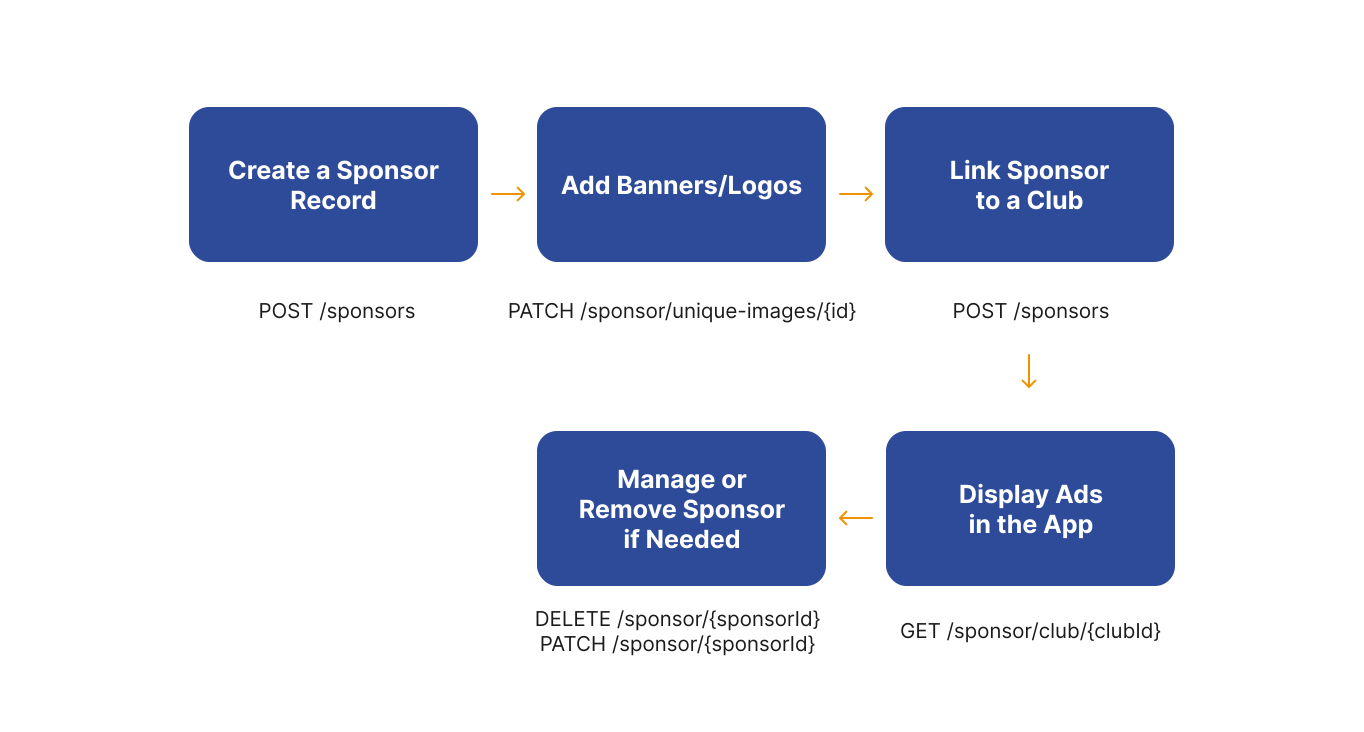
1. Create a New Sponsor
A sponsor might be a national sports brand, a local restaurant, or any organization supporting your club. COOLROOL stores sponsor details (name, logo, contact info) so you can later attach them to clubs or events. Use the POST /sponsor endpoint to create a new sponsor record.
- Request
- Response
curl --request POST \
  --url https://api.coolrool.com/sponsor \
  --header 'Authorization: Bearer <ADMIN_TOKEN>' \
  --form 'name=SuperSports' \
  --form 'description=Leading sports equipment brand' \
  --form 'isGlobal=true' \
  --form 'contactPersonName=John' \
  --form 'contactPersonSurname=Doe' \
  --form 'contactPersonPhone=+330000000' \
  --form 'website=https://www.supersports.com' \
  --form 'img=@/path/to/sponsor-logo.png'
{
  "id": 3001,
  "name": "SuperSports",
  "photoUrl": "https://cdn.coolrool.com/sponsor-logo-3001.png",
  "description": "Leading sports equipment brand",
  "isGlobal": true,
  "contactPersonName": "John",
  "contactPersonSurname": "Doe",
  ...
}
Sponsors marked isGlobal can appear in any club, while isLocal sponsors might only be relevant to specific regions.
2. Add Unique Images or Banners
Many sponsors want rotating banners or seasonal ads. You can store these images and schedule them for display in the app at certain dates using the PATCH /sponsor/unique-images/{id} endpoint.
- Request
- Response
curl --request PATCH \
  --url "https://api.coolrool.com/sponsor/unique-images/3001" \
  --header 'Authorization: Bearer <ADMIN_TOKEN>' \
  --form 'specialDate=2025-12-01T00:00:00Z' \
  --form 'endSpecialDate=2025-12-31T23:59:59Z' \
  --form 'url=https://cdn.coolrool.com/holiday-sale.jpg' \
  --form 'name=Holiday Sale Banner' \
  --form 'description=20% off all equipment'
{
  "id": 5002,
  "imageUrl": "https://cdn.coolrool.com/holiday-sale.jpg",
  "specialDate": "2025-12-01T00:00:00Z",
  "endSpecialDate": "2025-12-31T23:59:59Z",
  "name": "Holiday Sale Banner",
  "description": "20% off all equipment",
  "sponsor": {
    "id": 3001,
    "name": "SuperSports",
    ...
  }
}
3. Attach a Sponsor to a Club
If SuperSports is sponsoring Thunder FC specifically, you can link them so the club’s members see relevant ads in their app using the POST /sponsor/club-sponsor endpoint.
- Request
- Response
curl --request POST \
  --url https://api.coolrool.com/sponsor/club-sponsor \
  --header 'Authorization: Bearer <ADMIN_TOKEN>' \
  --form 'clubId=1001' \
  --form 'sponsorId=3001'
{
  "id": "club-sponsor-link-uuid",
  "club": {
    "id": 1001,
    "name": "Thunder FC"
  },
  "sponsor": {
    "id": 3001,
    "name": "SuperSports"
  },
  "isActive": true
}
At this point, members of Thunder FC may see SuperSports ads or banners in their COOLROOL interface.
4. Displaying Ads in the App
Once a sponsor is linked, COOLROOL automatically shows sponsor branding in relevant sections—like the event booking flow, the club dashboard, or a user’s news feed. You don’t need to code display logic unless you’re customizing the front-end. You can use the following endpoints to fetch sponsor data:
GET /sponsor/club/{clubId}to fetch all sponsors for a particular club.GET /sponsor/recommendation,GET /sponsor/global, orGET /sponsor/localfor more targeted sponsor groupings.
The following example shows how to fetch all sponsors for a particular club:
- Request
- Response
curl --request GET \
  --url https://api.coolrool.com/sponsor/recommendation \
  --header 'Authorization: Bearer <USER_TOKEN>'
[
  {
    "id": 3001,
    "name": "SuperSports",
    "photoUrl": "https://cdn.coolrool.com/sponsor-logo-3001.png",
    "description": "Leading sports equipment brand",
    ...
  }
]
5. Manage or Remove a Sponsor
If a sponsor contract expires or they no longer wish to appear, you can update or delete their record using the following endpoints:
PATCH /sponsor/{sponsorId}– Update sponsor details (e.g., name, contact info, or add/remove clubs).DELETE /sponsor/{sponsorId}– Remove the sponsor from COOLROOL entirely.
The following example shows how to delete a sponsor:
- Request
- Response
curl --request DELETE \
  --url "https://api.coolrool.com/sponsor/3001" \
  --header 'Authorization: Bearer <ADMIN_TOKEN>'
{
  "id": 3001,
  "deleted": true
}
Clubs previously linked to this sponsor will no longer display their ads.